VAHA: Community and gamification
As Lead Product Designer at VAHA, I designed community and gamification features for the smart mirror and its companion app, aimed at retention across live and on-demand classes.
Context
VAHA made a smart mirror for at-home training, a connected device that streamed live, encore and on-demand classes and offered training plans, with a companion app for members. In June 2021 the team had a new reactions feature, and live reactions were about to launch.
The aim was retention. A note on the workshop board, linked to the flow zone on Csikszentmihalyi’s diagram, says gamification would help users reach that state and come back.
01Workshop
Framing the workshop
I ran a gamification strategy workshop on engagement and retention in June 2021, my first month at VAHA, from a Miro board I set up for it. The board opens with a primer in four frames: Csikszentmihalyi’s flow model, the basics of a gamified experience, the main tools and Bartle’s player types.
The basics split a gamified experience into motivation, mastery and triggers. The triggers follow Fogg’s behaviour model: a facilitator for users who are motivated but lack the ability, a spark for users who are able but not motivated, and a signal for users who have both. The main tools are reward systems, challenges, storylines and competition.
Tearing down Strava, Duolingo and Reddit
The teardown grouped screens from Strava, Duolingo and Reddit by mechanic, among them Strava’s clubs, challenges and leaderboards, Duolingo’s streaks, XP, leagues and lightning rounds, and Reddit’s community awards and avatar customisation. Some labels use the primer’s words, such as a spark for a surprise gift box. Notes on the board ask what VAHA’s regular wins would be, given how well Duolingo’s frequent rewards for small wins work, and record that a challenge mechanic very close to Strava’s was already under consideration.
Ideating by player type
Ideation ran twice, a warm-up and then the full board, under four questions, the first “What will hook them in?” and the last “What will keep them coming back?” The columns are Bartle’s four types, each with a short profile, such as curious and not competitive for explorers. The full board holds 36 ideas, among them challenges that progress with a movement (50 squats, then 100), leaderboards across live and on-demand classes, a “join me” invite, a workout together with a fresh leaderboard, face-offs on camera in live classes and points to spend in a VAHA shop.
Dot voting the backlog
The same 36 ideas then went to a dot vote to prioritise the backlog, with the result laid out on the board in two columns.
Of the 36 ideas, 19 got votes, among them challenges that progress with a movement, streaks, levels, badges of honour on the profile, leaderboards across live, encore and on-demand classes, the “join me” invite, seeing who is active, success stories, kudos on friends’ activity, and rewards with points to spend in the shop.
Among the 17 without votes were content unlocked by level, special-occasion badges, notifications that set a timed challenge, face-offs on camera, a community championship, chat, sharing to social media and the workout together.
The board holds no UI, but several of the voted ideas are drawn in two Figma files, Community and Components, and so is the workout together, which got no votes. Neither file is dated.
02Tiles
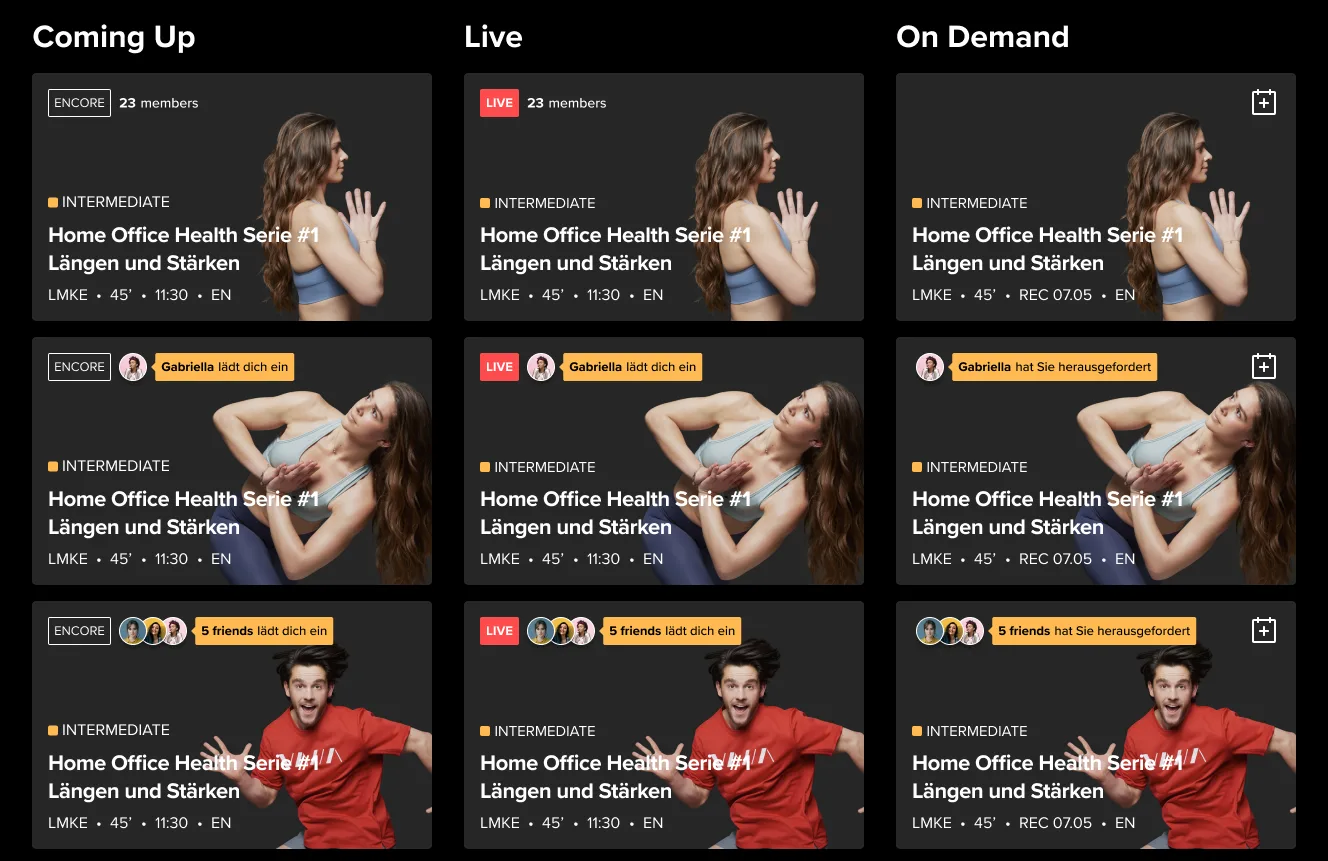
Social states on the class tile
The mirror and the app list classes as tiles, each with the class photography, the level, the title, the length, the start time and the language, and a tag for encore or live. In the Community file, headed New Tiles, I drew seven social states on that tile for classes coming up, live and on demand: two or more members in the class, one friend or several inviting you, one friend or several already in it, no one in it, and, for classes coming up only, a workout together with the friends you invited.
On demand, an invitation from a friend becomes a challenge, and the member count and the friends in class drop out. The Mobile frame has the same states on the app’s smaller tile, and the copy on both is in German and English.
Mobile tiles. The calendar control, on demand only on the mirror, also appears on classes coming up in the app.
Open in Figma ↗ Get password →Friends’ activity on the mirror
A second tile type on the mirror shows which class friends are in right now, with a line such as a friend meditating and a live dot on each avatar. I drew four cases for how the names and avatars fit: one friend, two names and avatars on one line, names wrapping under the avatars, and a large group cut to nine avatars and three names, with a count for the rest. The community tag that carries the member count, the friends line and the invitation on the class tiles is one component, with four statuses in up to four sizes.
Mirror friends activity. Each row is labelled with the rule it tests, on the same meditation class.
Open in Figma ↗ Get password →Community tags. Two versions of the member count, an icon with a number and a count of members, then the friends line and the invitation, from small to extra large.
Open in Figma ↗ Get password →03Components
Badges and streaks
Achievements are earned for minutes, workouts, live classes and streaks. A badge in progress is grey, with an orange stroke round its edge for the progress and a line for what is left, such as 120 to go, and an earned badge turns gold and carries its date. Records such as a top day or a top month are silver and bronze medals.
Each category has upcoming, in-progress and done states, and records run by day, month and year. Minutes, workouts, streaks, records and live classes each have a five-keyframe unlock animation, and in the streak animation the grey shield turns into a silver medal with a scatter of sparks.
Achievements panel. The minutes badge is a stopwatch, the workouts badge a hexagon and the streak badge a shield, and See all opens the full set.
Open in Figma ↗ Get password →Comparing minutes with friends
The friends comparison is a chart of cumulative minutes across the month, with the member’s line against the previous month, the VAHA average and anyone they add. It has week and month views, the month’s total and the next target. People are added from a panel that ranks members by total minutes, with a search by name and filters for location, gender, age group, fitness level and goals.
Friends chart. Each line ends in an avatar, the member’s own with the minutes so far, and anyone added can be removed from the legend.
Open in Figma ↗ Get password →Stories and the class card
Stories have a rail of friends’ stories with unread, read, publishing and published states, a viewer with reactions and view counts, and a camera with icons for text, colour, drawing, stickers and music. The capture flow has a second entry from a class, and that version adds a “Just worked out” card for the class to the photo.
A friend’s story. Five reactions under the photo, a clap and a drop of sweat among them, with the likes and views down the side.
Open in Figma ↗ Get password →A story from a class. The photo shows the mirror mid-class, with the class card attached and a class tag at the top.
Open in Figma ↗ Get password →One library for the mirror and the app
The designs in this study draw on one Components file, a UI library built with variant properties for status, type, size and timeframe. It has 13 card types, among them a mirror tile, a mobile tile, a friends activity tile and a story card. The metatags for live, encore, language and level, the live-status dots, the add toggle and the avatars, single and stacked, come in up to four sizes. There is also an on-screen keyboard for the mirror in three versions, current, updated and quick wins, filters for classes by level, duration, instructor, equipment and body part, and a VAHAButtons set.
Outcome
The components became part of the design system I built for VAHA, and both prototypes in the profile access test were built from them.
I ran the workshop in my first month at VAHA and handed the designs over when my contract ended in January 2022.
Contact
Get in touch
Product design lead across research, design systems and handover, with coding agents in the loop. Contract, outside IR35, or a permanent lead role.
- Available
- Now
- Location
- London, remote or hybrid, UK and EU
- Right to work
- UK settled status, EU citizen
- RolesLead Product Designer, Principal Product Designer, Design Engineer
- Experience10+ years
- ScopeResearch, design systems, prototyping, handover, QA with agents
- LanguagesEnglish, Italian, Spanish
- Email[email protected]
- LinkedInlinkedin.com/in/dariocodipietro
Professional profile
Copy into your coding agentSkills
- Product design, end to end
- UX and interaction design
- Visual design and motion
- Prototyping in Figma and code
- Design systems at scale
- User research and testing
- A/B testing and analytics
- Strategy and discovery
- AI product design
- Design to code, with agents
- Accessibility, WCAG 2.2 AA
- Leadership and mentoring
Platforms
iOS, Android, responsive web, smart TV and connected devices
Sectors
- AI products
- B2B SaaS
- Consumer apps
- Streaming, media and sport
- Health, wellness and food
- Legal tech
- Telecoms and utilities
Tools
- Figma
- FigJam
- Figma Make
- Claude Design
- Framer
- Axure RP
- Storybook
- Claude Code
- Cursor
- Codex
- MCP
- GitHub
- Linear
- Jira
- Confluence
- Notion
- Miro
- Prolific
- Lyssna
- Maze
- PostHog
- Amplitude