DAZN: Downloads
As Senior Product Designer at DAZN, I designed downloads for the iOS and Android apps, a post-launch feature to keep users engaged with catch-up sport when they were offline.
Context
In mid 2016 DAZN’s product design team split its work between the launch in the DACH markets and the features planned to follow it, among them the sports schedule, a new navigation, event tiles, alerts and downloads.
In the July 2016 leadership review, the brief for downloads was a one-tap download of any available video from the player, and later from browse, with automatic downloads of the teams and sports a user follows. The navigation brief in the same review, a native pattern with room for downloads, following and a schedule, is the subject of Navigation v2.
Mapping the downloads tab
I worked through a series of quick prototypes, testing versions in internal team workshops and guerrilla sessions, until I settled on a simple section where users manage and watch their downloads, and which explains the feature on their first visit.
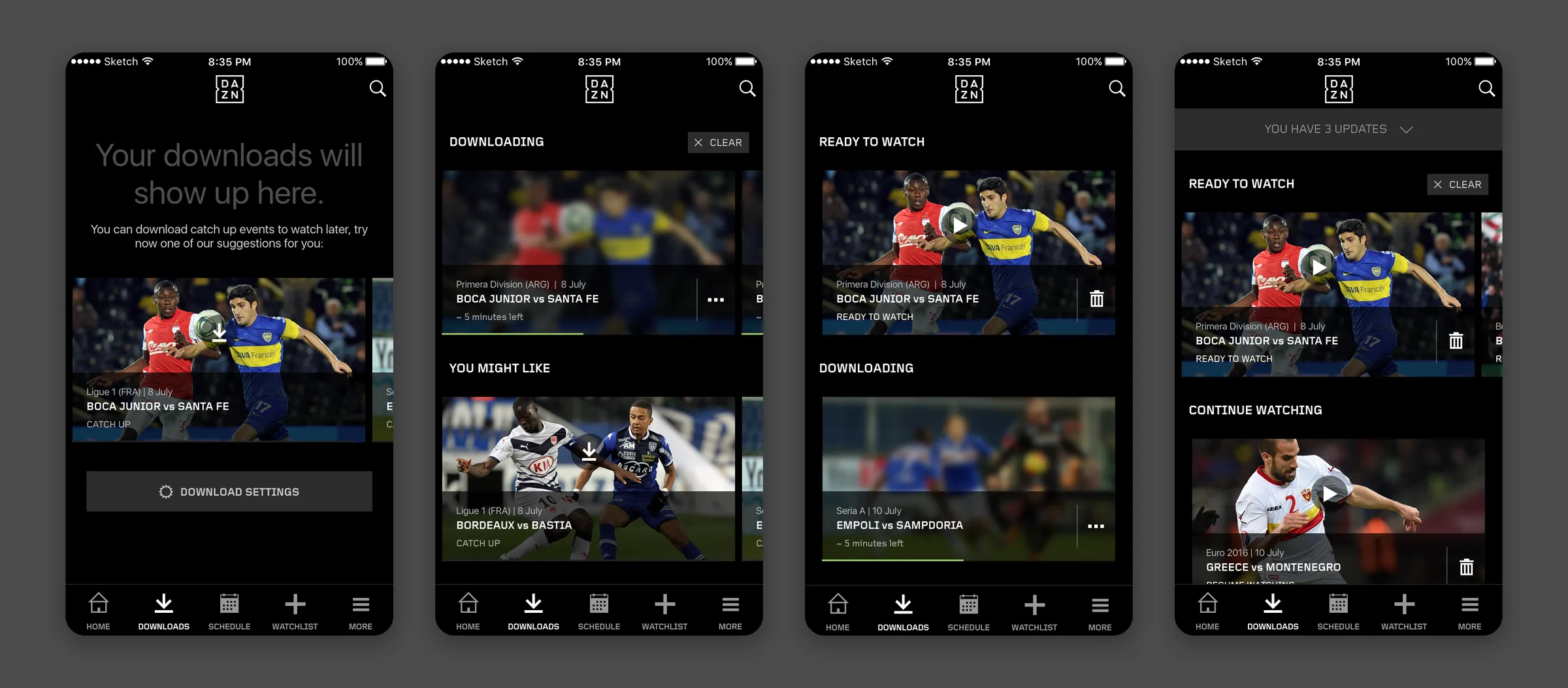
Downloads had a tab of its own in the native apps. An empty tab shows a line on downloading catch-up events to watch later, suggestions with a download action on each, and the download settings.
Once there are downloads, they are grouped by state, in the order Ready to watch, Continue watching, Downloading and Watched, with the suggestions and settings after them. The version for the leadership review used the tiles then in the app, in a two-column grid, with only Downloaded and Downloading.
Leadership review, July 2016. Gesture icons between the screens mark a pull for more suggestions, a tap to download, time passing and a tap to remove. Removing an event brings up a confirmation that states the space it frees on the device.
01Round one
Designing each state at eight breakpoints
I drew seven states on both platforms, 46 renders in all: the empty tab, more suggestions loading and loaded, a download in progress, one ready while another downloads, the full list, and the actions on a download.
Each downloaded tile names what the user can do with it: Ready to watch, Resume watching or Watch again. A download in progress shows a blurred image, the time left and a progress bar, and its menu opens Pause download and Cancel download over the tile. The bin on a tile and the Clear button on a section remove downloads.
On phones each section is a carousel, and pulling past the last suggestion loads more. The iPad and the 600 dp Android tablet show the suggestions as a two-column grid with Load more. Android has its tabs at the top, under a Watch app bar.
Downloading, at every breakpoint. iOS at 320, 375, 414 and 768 points above Android at 360, 384, 480 and 600 dp, all at one scale. The 480 dp set is drawn on a Kindle Fire, with its navigation bar.
iPhone, the full list. Three updates sit in a collapsed banner at the top. A watched download stays under Watched, to watch again, until the user clears it.
Android, the full list. The same sections under scrollable tabs, with the number of updates as a badge on the Downloads tab.
02Round two
Moving downloads into Navigation v2
Downloads stayed in the tab bar in Navigation v2. The tile of a download in progress now has a cancel button and a pause button ringed by its progress. A finished download moves up into Ready to play, above the ones still running, and a removed download can be brought back with Undo. In the iOS presentation to Apple in January 2017, downloads was the only flow marked as a future release. Downloads used the same tiles as the home page, so I redesigned them while working on it, and the result replaced the old tiles across the service.
Navigation v2, January 2017. From the Home tab to an empty Downloads tab, two suggested downloads started, and the first one ready to play. Suggested downloads stay under the user’s own at every step.
Downloads could also start from a tile. On an event still live, the tile’s options offer add, play and a scheduled download, a download icon with a clock. In Settings, each team, player or competition a user follows lists Alerts and Downloads, the automatic downloads in the brief.
Tile options, Navigation v2. The options open over the tile’s own image, blurred behind them. The download with a clock is a glyph of its own in the v2 icon font.
Downloading from the player
The player came first in the brief. A colleague mapped that flow in July 2016 by what the user is watching and what can be downloaded now or later. In the 2017 player states for iOS and Android, a sheet offers highlights or the full game with the size of each, or only the full game while highlights are not ready. An event not yet available can be queued with its expected time, and a download on a full device ends in a message to free up space.
Player download states, Android. Phones on the top row and a 600 dp tablet below, where the choice opens as a popup over the player. The player itself shows Downloading highlights or Download queued once the choice is made.
03Round three
Rebuilding the list around storage
In Navigation v2.1 I redrew the tab for iPhone, on the Sketch page kept for its InVision prototype, with Search in the tab bar and cast and edit in the header.
I moved downloads from rows of tiles to a single list, where each row shows the minutes and megabytes left, or that the download is paused or expiring.
Edit mode opens with the space all downloads take up on the device, and selecting downloads shows how much space they use before the delete. A swipe on a row reveals delete for a single download.
Navigation v2.1, iPhone. The empty tab with popular events, a download started, the full list, a swipe to delete, edit, and a selection of two. The thumbnails are placeholders in the Sketch file.
My handover includes the v2 icon font, exported for iOS and each Android density, with glyphs for download, scheduled download, pause, bin, edit and undo.
Outcome
Downloads was still marked as a future release in January 2017, and v2.1 was the last version I drew. After I left, DAZN was trialling downloads with some users in Japan by June 2019, with a choice of full match or highlights and a Download tab (Appllio).
The first versions were drawn before DAZN launched, with no data yet on how its users would download. After Navigation v2 rolled out I moved to the NFL Game Pass International white label.
Contact
Get in touch
Product design lead across research, design systems and handover, with coding agents in the loop. Contract, outside IR35, or a permanent lead role.
- Available
- Now
- Location
- London, remote or hybrid, UK and EU
- Right to work
- UK settled status, EU citizen
- RolesLead Product Designer, Principal Product Designer, Design Engineer
- Experience10+ years
- ScopeResearch, design systems, prototyping, handover, QA with agents
- LanguagesEnglish, Italian, Spanish
- Email[email protected]
- LinkedInlinkedin.com/in/dariocodipietro
Professional profile
Copy into your coding agentSkills
- Product design, end to end
- UX and interaction design
- Visual design and motion
- Prototyping in Figma and code
- Design systems at scale
- User research and testing
- A/B testing and analytics
- Strategy and discovery
- AI product design
- Design to code, with agents
- Accessibility, WCAG 2.2 AA
- Leadership and mentoring
Platforms
iOS, Android, responsive web, smart TV and connected devices
Sectors
- AI products
- B2B SaaS
- Consumer apps
- Streaming, media and sport
- Health, wellness and food
- Legal tech
- Telecoms and utilities
Tools
- Figma
- FigJam
- Figma Make
- Claude Design
- Framer
- Axure RP
- Storybook
- Claude Code
- Cursor
- Codex
- MCP
- GitHub
- Linear
- Jira
- Confluence
- Notion
- Miro
- Prolific
- Lyssna
- Maze
- PostHog
- Amplitude