Sportsnet: Next-generation app concept
As Lead Product Designer at Deltatre, I led a next-generation concept for the Sportsnet app, which Rogers used to make the internal case for a new app.
Context
Rogers Sportsnet’s app, on iOS and Android, carried news, scores and highlights, live radio and SN NOW streaming for subscribers. It was busiest when games were on and when news broke. Its core users were older than the audience the Sportsnet brand was aiming at, and the app had no social layer.
At kickoff, Rogers set goals to grow monthly active users, overtake its main Canadian competitor, drive subscriptions to SN NOW and SN NOW+ and earn more from advertising, with betting to follow later. The concept was to show what a future version of the app could look like on existing technology, to engage a younger audience and add value for existing customers.
Auditing the app and the market
Our desk research before kickoff started with the current app, captured flow by flow, and its store reviews, where users complained about sign-in, regional blocks and casting to the TV. I tore down eleven sports apps, first those I could install in the UK, from DAZN and Sky Sports to BBC Sport, then TSN, ESPN, theScore and CBS Sports, the Canadian competitors Rogers’ team named. Nine more, from The Athletic to Shazam and Duolingo, were for onboarding patterns.
Most of the sports apps shared one feature set and rarely went beyond it. The preliminary insights from this research, shared at kickoff on a Miro board, set that feature set beside ideas that went beyond it, from onboarding that profiles the fan through a conversation to gamification, community, watch together and data overlays on the stream. On a strategy canvas we compared Sportsnet’s offering levels with direct rivals, video services and the apps competing for a fan’s attention.
Preliminary insights, shared at kickoff. Each group of reference screens from the teardown carries a note on what it could do for Sportsnet. Watch together and profiling questions in onboarding both reached the final UI.
Open in Figma ↗ Get password →01Discovery
Grounding the proto-personas in Rogers’ segmentation
The first proto-personas came from assumptions. I rebuilt the set on Rogers’ fan segmentation research, one proto-persona for each of its six segments, and we prioritised the sports buff and the next gen, the two high-consumption segments, and the social snacker, at 22 the youngest.
Cutting the backlog by lifecycle stage
I collected Rogers’ requirements for the new app into feature buckets and added new ideas to each, then cut the same backlog by lifecycle stage: onboarding, four realms of engagement (watch, listen, read and play) and self-serve, with each feature marked in or out. The play realm did not exist in the current app at all, with no fantasy, games, betting or social features.
I placed the backlog along day-in-the-life journeys for a gameday and a day without a game, from the morning notification to a second screen and stadium mode during the game, and dark mode before bed.
02Co-creation workshops
Co-creating journeys with Rogers
We ran a set of workshops with Rogers. In one, after reviewing the competitive arena and the customer lifecycle, we gave 25 minutes to the proto-personas and the research behind them, and 50 to co-creating the key journeys for the three priority personas.
For each persona we mapped jobs, pains and gains against pain relievers, gain creators and features. In the account journey we set out the entry points into the app: signing in, creating an account, or going straight in and personalising later. In the persona journeys we followed each fan around a game, from odds and live trackers for the sports buff to highlights and sharing for the social snacker.
Value proposition map, the social snacker. Story-style navigation and short-form video on this map reached the final home, and the NFT market stayed in discovery.
Open in Figma ↗ Get password →We left the workshop with the backlog in three priority tiers, from the news feed, scores and SN NOW at the top, through a personalised feed, vertical video, and DTC and TVE entitlements, to betting partners, fantasy integration and merchandising.
After the workshops we iterated on wireframed journeys, most of them mine, which became the basis for the final UI.
Wireframed journeys. A live feed options screen already let fans switch game plays, social updates, odds, fantasy updates and polls on or off. In the final game page, betting and fantasy updates arrive as modules the fan can close, and a poll can be asked to show less.
Open in Figma ↗ Get password →Building the home and game page from modules
The backlog ran from polls and live odds to watch parties and merchandise, and on the gameday journey a fan’s needs changed from the build-up to the final whistle.
We built the home and the game page from one set of content modules. Both are personalised to each user, and the game page also changes with the game’s state, showing only the modules that fit it, from the days before the game to the replays.
A new feature could go in as a module and be tested on its own, without redesigning either page, and the rest of the app reuses the same modules.
Content modules on the live game page. The same page with a poll, betting updates from three bookmakers, a stream from Sportsnet’s team in the crowd, a points offer from Netflix, and team caps to buy.
Open in Figma ↗ Get password →03Delivery
Designing the final layouts and prototypes
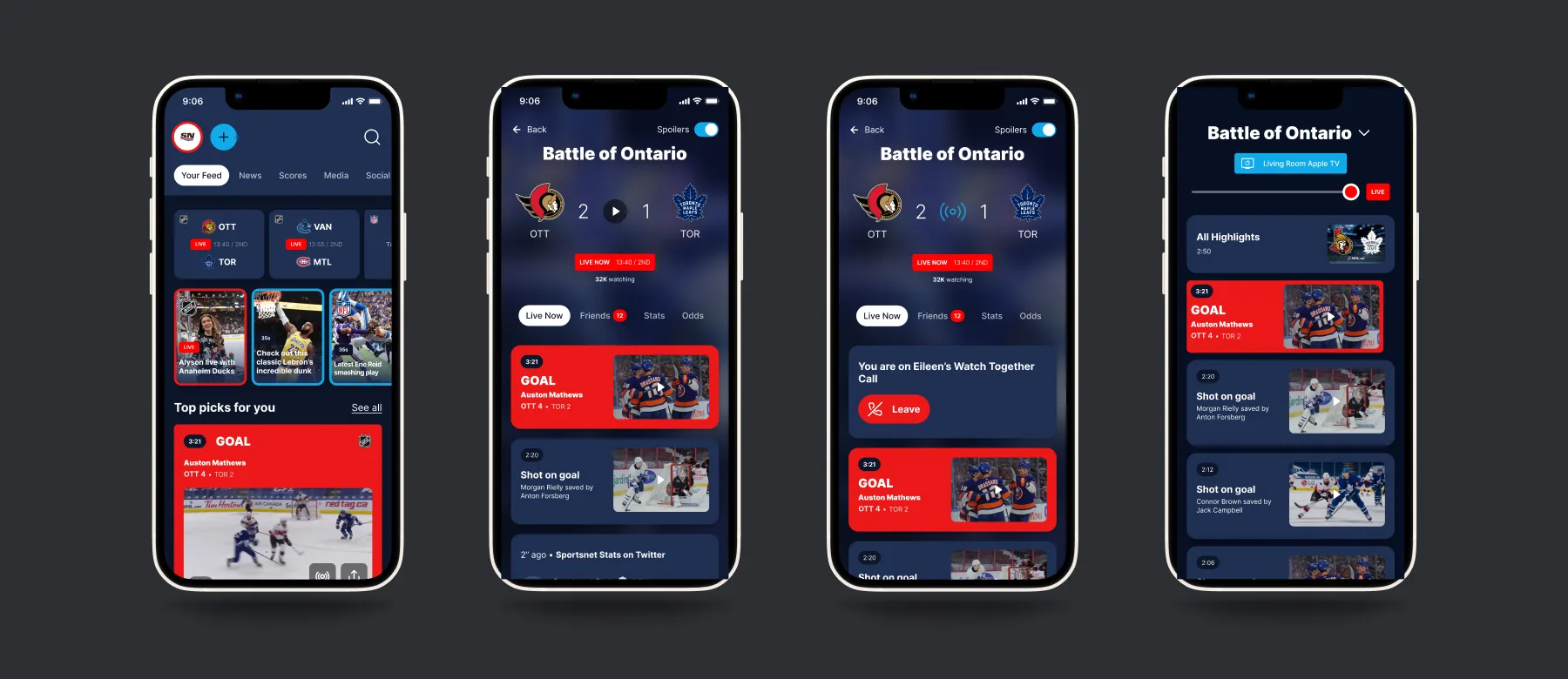
I designed all of the final layouts and built the prototypes. The home opens on the fan’s live games, story-style highlight clips and top picks, with favourites added by search and pages for athletes. The game page runs from the build-up to the live game, and lets the fan cast to a living room Apple TV or share a clip to an Instagram story.
Rogers wanted social features built deep into the app. Watch together starts from the game page’s friends tab, and an invite can also appear on the TV. The call ends with a summary of how many watched and for how long. For betting and fantasy I designed modules for the game page and dedicated zones. I also explored stats on tap over the video, multiple cameras and locker room cameras for the watch experience.
Personalised home. The athlete page comes from a note at kickoff about following a player such as LeBron James, whatever his team.
Open in Figma ↗ Get password →Rebuilding onboarding
I rebuilt the onboarding on patterns from the teardown, select-to-follow with search, local teams by location and progressive questions, and on Rogers’ requirement for progressive profile building. The first screen, the location prompt and the account step stayed as they were.
One favourites screen replaced a tab for each league and a separate leagues grid, with nearby teams, leagues and each league’s teams in rows under one search. Three questions then profile the fan before the account step: how closely they follow sports, how they watch games, and what they want to do in the app.
Current onboarding, TestFlight captures. Picks from every tab gathered in a favourites tray at the foot of the screen, and the location prompt came before any team was shown.
Open in Figma ↗ Get password →Rebuilt onboarding. The sports fan question runs from not following sports to a massive fan, and the last question offers watch, read, listen, play, connect, rewards, bet and share, to choose all that apply.
Open in Figma ↗ Get password →Theming and micro-animations
Rogers’ head of design asked us for a few journeys and prototypes beyond the scope, to show their product design team how the new design could work with existing requirements, such as full light and dark mode support. I had worked on the assumption that theming would be needed, mostly with dynamic components, and delivered a set of themed screens as a starting example. I documented micro-animations where a prototype could not show a pattern on its own, such as the scroll on the game page.
Light and dark themes. The Betting Zone, a fantasy team and the live game page, each drawn in both themes from the same components.
Open in Figma ↗ Get password →Game page scroll, five frames. The banner shrinks to a score bar with the tabs pinned, while the live crowd, watch together and goal modules move up beneath it.
Open in Figma ↗ Get password →Designing the component library
The final layouts were assembled from one component library in the design file, and the home reused components I had built for the other sections. The library holds the game banner in five states and each module in its states, such as a poll from its start to its result, with game page tabs, fixtures, news items, team badges and favourites sets beside them, many in light and dark. At handover, the final layouts and prototypes went to Rogers.
Game banner, five states. Coming up with the game saved, live with a spoilers toggle, the mini score bar the page scrolls to, and the video player live and on demand.
Open in Figma ↗ Get password →What was handed over, and what stayed in discovery
Stayed in discovery
- An NFT market of best plays
- AR for the stadium and the second screen
- Car mode for live games and shows
- Fantasy teams imported from Yahoo
- Check-ins at stadiums and bars
- Downloads, and articles read aloud
Handed over
- A personalised home built from modules
- A game page for every state of a game
- Modules for polls, betting, partners and merch
- Watch together, with invites on the TV
- Betting and fantasy modules and zones
- A rebuilt onboarding
- Light and dark themes, and micro-animations
Many options stayed in discovery, on the boards Rogers could open throughout the engagement.
Outcome
Sportsnet used the concept to push internally for a new, more engaging app that could take on at least some of the features explored. The new app then went into delivery in steps.
Rogers took part in every phase, from the kickoff to the review sessions where the requests for themed screens and micro-animations came up. The concept had no product timeline, and I explored a wide range of features with few constraints.
Contact
Get in touch
Product design lead across research, design systems and handover, with coding agents in the loop. Contract, outside IR35, or a permanent lead role.
- Available
- Now
- Location
- London, remote or hybrid, UK and EU
- Right to work
- UK settled status, EU citizen
- RolesLead Product Designer, Principal Product Designer, Design Engineer
- Experience10+ years
- ScopeResearch, design systems, prototyping, handover, QA with agents
- LanguagesEnglish, Italian, Spanish
- Email[email protected]
- LinkedInlinkedin.com/in/dariocodipietro
Professional profile
Copy into your coding agentSkills
- Product design, end to end
- UX and interaction design
- Visual design and motion
- Prototyping in Figma and code
- Design systems at scale
- User research and testing
- A/B testing and analytics
- Strategy and discovery
- AI product design
- Design to code, with agents
- Accessibility, WCAG 2.2 AA
- Leadership and mentoring
Platforms
iOS, Android, responsive web, smart TV and connected devices
Sectors
- AI products
- B2B SaaS
- Consumer apps
- Streaming, media and sport
- Health, wellness and food
- Legal tech
- Telecoms and utilities
Tools
- Figma
- FigJam
- Figma Make
- Claude Design
- Framer
- Axure RP
- Storybook
- Claude Code
- Cursor
- Codex
- MCP
- GitHub
- Linear
- Jira
- Confluence
- Notion
- Miro
- Prolific
- Lyssna
- Maze
- PostHog
- Amplitude