Samsung Food: Tailored Plan
As Lead Product Designer at Samsung Food, I led the planner from a manual, empty-state experience to a prepopulated Tailored Plan: a generated weekly plan with setup, review, regeneration, shopping list integration and a freemium model, released across two handovers.
Context
The casual planner had shipped: a list view with a check per meal, and tailored meals reachable from the add flow. Adoption of the recommendations was still gated on intent. A user had to open an empty planner, go to the tailored plan, add meals to their own plan, then add from their plan to a shopping list. Four manual steps, each a drop-off point, from an empty and uninspiring entry point. From memory, roughly one in eight active users planned, and planners were the stickiest cohort, which is what made the entry point worth the investment.
The hypothesis on the board from a 1:1 in November: follow the prepopulated pattern (Mealime, MealPrepPro, Innit). Generate the plan, let the user tweak it, and derive the shopping list from it. Opt-out rather than opt-in, with loss aversion doing some of the work. Two how-might-we questions framed the workstream: move people through planning faster to reach the next phase, and reach the moment of a populated plan and shopping list in a fraction of the time and effort.
From an empty planner to a generated one
Iterations 0 to 3 settled the container. Iteration 0 explored a prepopulated list and a prepopulated calendar in parallel, each reviewed with the PO. Iteration 1 added tailored plan variants and plan collections. Iteration 2 carried the current versus future diagram and two ways to connect an opt-out plan to the shopping list: a short confirm-and-generate flow that verifies the pantry and removes unwanted items, or surfacing the plan’s contents inside the list to confirm before adding. Iteration 3 fixed the two candidates as test variant A (list) and test variant B (calendar) and reviewed them with Growth.
Iteration 2, the hypothesis. Current: empty plan, go to tailored plan, add to my plan, add to my shopping list. Future: generated plan, tweak or remove, shopping already generated from it. The two shopping list connections sit below.
Open in Figma ↗ Get password →Iteration 3, variant A. The generated week as a list, reached from a review notification, with the shopping list updated as part of the flow.
Open in Figma ↗ Get password →Iteration 3, variant B. The same journey in the calendar view. Both went to Growth for review as the two candidates.
Open in Figma ↗ Get password →01Setup
Setup flow
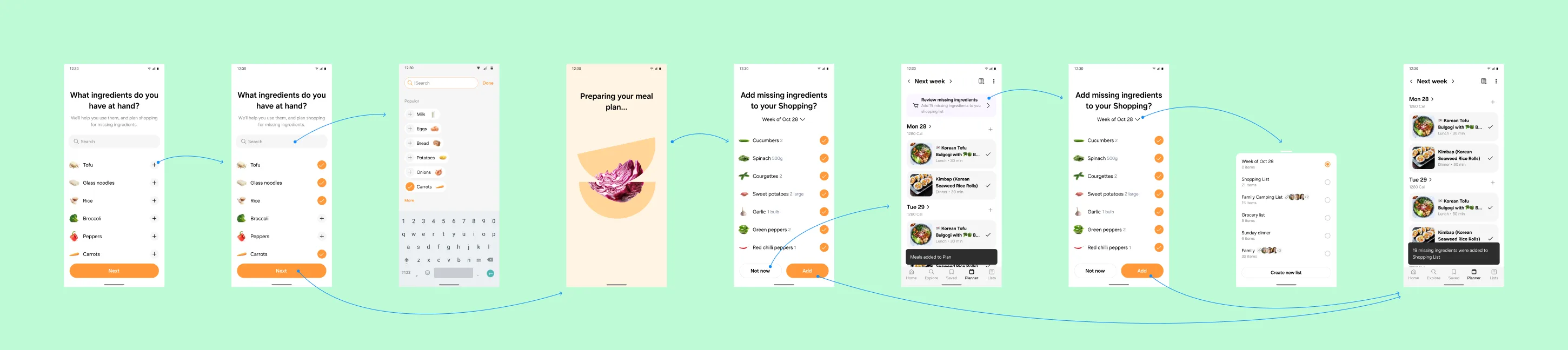
Iterations 4 to 6 built the setup. First access from the empty planner or a home placeholder: which meals to plan for (weekday dinners recommended as the start), meal preferences prepopulated from onboarding and Samsung Health data, a preview of what the plan would look like, ingredients at hand to seed the shopping list, and final toggles for a weekly plan, weekly shopping and reminders. Cancelling returns to the empty plan. Six questions were reduced to five after the previz split one step in two and the design team agreed it worked as one.
A jam with the second designer added the date picker variants, the flavour profile (diet, avoidances, favourite cuisines, dislikes), and the setup question that shaped the plan most: how many times do you want to cook per week, since fewer cooks means fewer distinct meals and more leftovers planned. Iteration 6 added plan states, plan review options and the generating state, an animation on the Recipe AI pattern, with a copy note that it may take up to twenty seconds.
Iteration 4, first access. Seven steps with the reasoning pinned above each: preferences from onboarding and Samsung Health, a preview before committing, ingredients prepopulated from the plan settings.
Open in Figma ↗ Get password →Iteration 5, flavour profile. Diet and avoidances reused from onboarding; cuisines and dislikes still to design.
Open in Figma ↗ Get password →Iteration 6, setup. Cooks per week, start day, meals, preferences, ingredients at hand, final toggles, generating, plan. The leftover question has three variants along the bottom.
Open in Figma ↗ Get password →Design reviews and research
Iterations 7 and 8 went to the wider team as design reviews, each page carrying its questions beside the screens. Two forms of setup were put side by side: the stepped flow, and a conversational setup generated with ChatGPT, a chat that asks the same questions in turn and ends in the same plan. Two forms of review were put beside each other too: stepped review, as in setup, or a single page review. The freemium section appeared here for the first time, with three entry points explored. Iteration 9 added the shopping integration and the review-day model: Sunday is review day, the next plan is prepared as the current one ends, and the user is told in app and by email with time to adjust before it starts.
InformWhere POs disagree or are undecided on direction, research gives them evidence to decide on.
ValidateOnce direction is agreed, research checks that the solution holds up with users.
Research ran alongside the reviews, on the same cadence as the casual planner: moderated sessions on the list and calendar variants to inform the container decision, then on the setup flow and the plan review to validate them once direction was agreed. The research files sit outside the design files and are not reproduced here; the decisions below carry their outcomes.
Iteration 8, design review. Stepped setup above, conversational setup below, and the question to reviewers on which they preferred. The chat transcript is on the board so the reviewers could read every turn.
Open in Figma ↗ Get password →Iteration 8, plan review. The Sunday notification into a settings page, ingredients, regeneration, and accept plan. The question beside it: stepped review or single page.
Open in Figma ↗ Get password →Iteration 10, plan edit. The overflow menu on a generated week, plan settings, and regeneration from a changed setting. The email is the second channel for review day.
Open in Figma ↗ Get password →Choosing the setup model
The design reviews and the research sessions settled three things. Stepped setup over conversational: the chat read well as a demonstration and cost more to build, review and localise for the same inputs. Single page review over stepped review, since a returning user is changing one setting, not answering five questions. And a freemium gate, with three variants taken to handover so the PO could pick one against the subscription data.
The plan is generated from settings the user already gave us, so setup asks only for what onboarding does not hold: cooks per week, start day, meals to plan, ingredients at hand. Everything else is prepopulated and editable.
Freemium is applied to the plan, not the planner. Three free tailored plans, then the Plus trial. The list view and the calendar stay free.
02Around the plan
Shopping, leftovers, nutrition
Iterations 10 and 11 hung the rest of the planner off the generated plan. Shopping list integration in two variants: add missing ingredients at generation, or a review missing ingredients banner on the plan; both resolve to the same week-of picker in Lists. Leftovers in made it, with portions auto-scheduled to tomorrow’s lunch and a manual override. Meal history in two variants. Nutrition in the prepopulated plan: calories per day and the macro split in the plan header and on each day, from the same data the health dashboard reads. Notes, daily view, date variants and header variants filled out the rest of iteration 11.
Iteration 11, shopping list integration. Two entry points into the same picker, and the list named after the week. The note on the right settles how a long name truncates.
Open in Figma ↗ Get password →Iteration 11, nutrition in the plan. Calories and macros in the header and per day. Repeated meals are marked leftovers, which is the cooks-per-week setting made visible.
Open in Figma ↗ Get password →Iteration 12, swap. Swap a meal from saved, leftovers, previously planned or swap ideas. The existing add journeys are reused, marked on the board.
Open in Figma ↗ Get password →03Handoff
Two handovers
Handover one, iteration 10, carried setup and the three freemium variants: three free plans with a counter, limited meals per plan, and straight to the paywall. Handover two, iteration 12, carried the shopping list integration, the food list integration and swap. Each handover page is the journeys only, with the review pages left behind it, so engineering reads one page per release.
Handover one, setup. Every step of the stepped setup with its sheets, from entry point to generated week. Plan review day is a step in the flow, not a setting.
Open in Figma ↗ Get password →Freemium, three free plans. A counter at generation, then the Plus trial. The variant that keeps the plan visible longest.
Open in Figma ↗ Get password →Freemium, to paywall. The shortest path to Plus, at the cost of never showing a free plan.
Open in Figma ↗ Get password →What was cut, and what shipped
Explored
- Prepopulated calendar view as the container
- Conversational setup
- Stepped review on return
- Meal history
- Limited meals per plan, and straight to paywall
- Pantry confirmation before generating the list
Handed over
- Stepped setup, prepopulated from onboarding
- Generated week in list view, accept or clear
- Plan review day, in app and by email
- Single page review, settings and regeneration
- Shopping list integration from missing ingredients
- Swap from saved, leftovers and previously planned
- Three free plans, then the Plus trial
The left column is every option that asked the user for more than the plan needed, or asked engineering for more than the first release needed. The right column is what a generated plan needs to be accepted, kept and shopped for.
One field to add anything
Iterations 12 and 13 took on the add flow itself, starting from data. The PO had captured what users typed when they created a new recipe from inside the planner, which made little sense mid-planning, and I ran the set through ChatGPT for themes: 41% were referencing dish names, 22% adding food items or ingredients, 18% quick-saving online recipes, 12% managing leftovers and meal prep, 7% creating a full recipe. The same analysis on user notes, run through Claude, found the same pattern independently: 42% meal names and basic descriptions, 20% leftover and snack planning, 14% placeholder entries.
The rule that followed replaced the add menu with a text field. If the query contains a meal with an exact match in the database, return it; if it contains a meal with no match, generate one with an exact match; beneath the match, surface leftovers, saved, collections, communities and creators the user follows. If the user has pasted a URL, import the recipe. Otherwise it is a note. High confidence adds without a prompt; low confidence asks. Auto notes came from the same rule: a note that names meals offers to add them, and asks whether to keep the text.
Iteration 13, the analysis. Two independent runs on two data sets found the same pattern. The rule on the right is what the add field implements.
Open in Figma ↗ Get password →Iteration 13, adding meals. Exact match from the database, generated match when there is none, and the sources a match can come from. The confidence note on the right decides when to prompt.
Open in Figma ↗ Get password →Outcome
Handover one and handover two went to engineering in the first quarter of 2025, and the Tailored Plan setup and generation were in delivery when I left Samsung Food. The workstream closed the loop the health dashboard and the casual planner had opened: onboarding and Samsung Health data drive a generated plan, the plan drives the shopping list and the leftovers, and the plan’s nutrition reads back into the dashboard. The add field and auto notes stayed in design as the next brief. Samsung’s IFA 2024 announcement carried the first public version, “Tailored for You” plans with three days free and a full week on Food+, and the help centre now describes the For You section as a redesigned version of the Tailored Plan. From memory, after release almost every active user held a tailored plan and regular planning rose well beyond the earlier one in eight; the figures are not public.
Fourteen iterations is a long run for one surface, and most of the length went on what the plan touches rather than the plan itself. Shopping, leftovers, nutrition and notes each had their own workstream before this one, and the generated plan is what let them share a source. The planner stopped being a calendar with features attached and became the thing the features derive from.
Contact
Get in touch
Product design lead across research, design systems and handover, with coding agents in the loop. Contract, outside IR35, or a permanent lead role.
- Available
- Now
- Location
- London, remote or hybrid, UK and EU
- Right to work
- UK settled status, EU citizen
- RolesLead Product Designer, Principal Product Designer, Design Engineer
- ScopeResearch, design systems, prototyping, handover, QA with agents
- Email[email protected]
- LinkedInlinkedin.com/in/dariocodipietro